Switching AI Coding Accounts Without the Logout Dance
Tired of logging in and out of your AI coding tools? Learn how to effortlessly switch between multiple accounts like Copilot & Cursor without the logout dance. Boost your developer productivity!
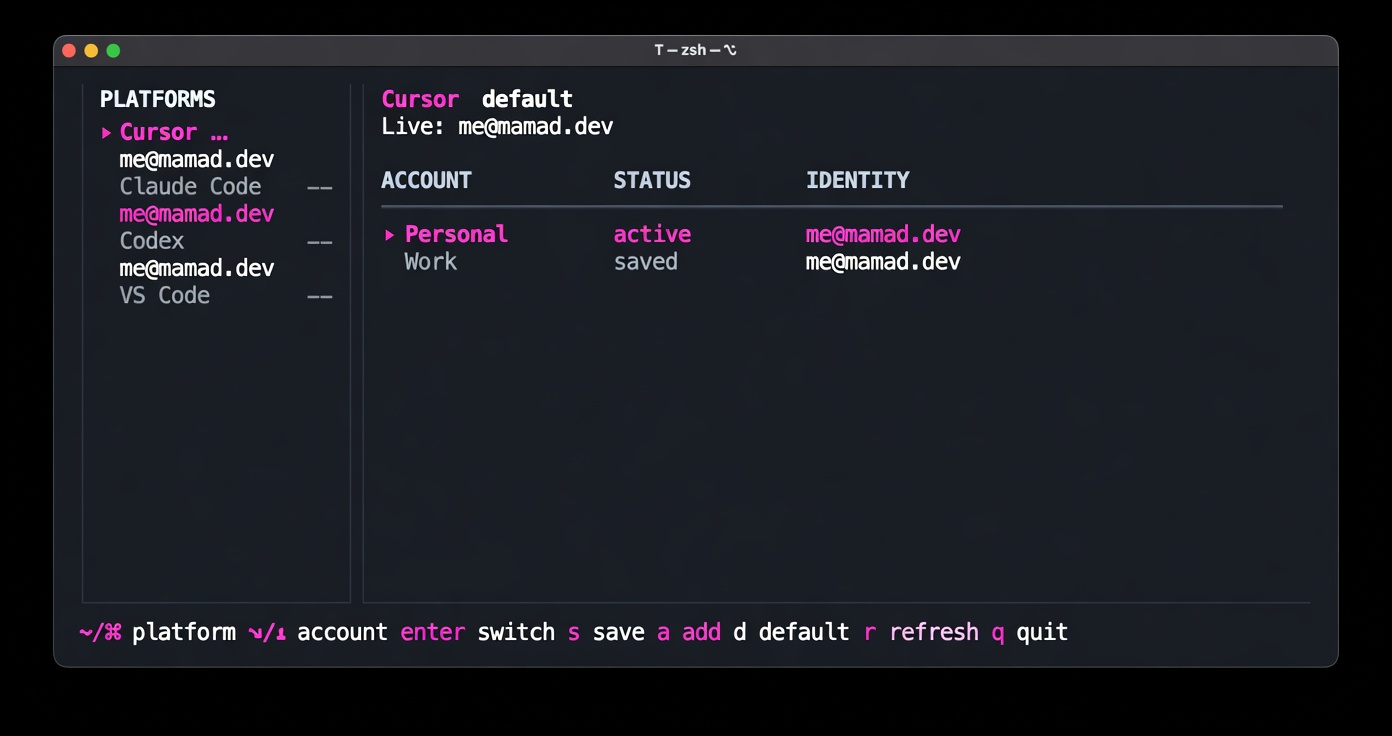
Table of Contents
The problem
If you use more than one account for AI coding tools — personal Cursor, work Cursor, a side-project Claude Code login, Codex on another ChatGPT account — you know the drill:
Sign out
Sign in again
Wait for OAuth
Hope the app actually picked up the new session
Repeat tomorrow
Each tool stores auth differently. Cursor and VS Code use SQLite (state.vscdb). Claude Code splits tokens and account metadata across Keychain and ~/.claude.json. Codex uses ~/.codex/auth.json. None of them ship a “switch profile” feature.
I built cursor-account-switcher to fix that: save sessions as named profiles, swap them in one command, optionally restart the host app.
What it does
cursor-switch is a small Go CLI that:
Saves the current auth session under a profile name (
personal,work, etc.)Restores a saved profile into the live auth store
Force-quits and relaunches apps that need it (Cursor, VS Code)
Leaves CLI-only tools alone (Claude Code, Codex) — no restart needed
Everything stays local under ~/.cursor-account-switcher/. No cloud, no account server.
Supported platforms
PlatformProfile storageRestarts app?Cursorstate.vscdb auth keysYesClaude CodeOAuth tokens + ~/.claude.json accountNoCodex~/.codex/auth.jsonNoVS Code / Copilotstate.vscdb + KeychainYes
Each platform has its own account list and saved profiles. Switching Claude doesn’t touch your Cursor profiles.
The dashboard TUI
Run cursor-switch with no args and you get a full-screen dashboard:
Left: all platforms, live session indicator, default marker
Right: accounts for the selected platform — status, email, last saved time
Keys:
←/→platform ·↑/↓account ·enterswitch ·ssave ·aadd ·dset default ·rrefresh
No more scrolling through a flat list of “Switch Personal / Save Personal / Switch Work / Save Work” for every platform.
Quick start
Install (macOS / Linux):
curl -fsSL https://raw.githubusercontent.com/reloadlife/cursor-account-switcher/main/install.sh | bash
Save your current sessions:
cursor-switch save personal
cursor-switch save work
Switch:
cursor-switch switch work
Multi-platform:
cursor-switch --platform claude save personal
cursor-switch -p claude switch work
cursor-switch p list          # platform aliases: p, platforms, plat
How it works (without the magic hand-wave)
Under the hood it’s boring on purpose:
Read auth from the platform’s real storage (SQLite, JSON files, macOS Keychain)
Write it to
~/.cursor-account-switcher/<platform>/profiles/<name>.jsonOn switch: write saved auth back, update active profile, quit + reopen the IDE if needed
Claude Code was the trickiest: macOS Keychain holds a big JSON blob (OAuth + MCP plugin tokens). The tool extracts only claudeAiOauth, reads email from oauthAccount in ~/.claude.json, and merges tokens back on restore so MCP auth doesn’t get wiped.
Security
Profiles contain live auth tokens. Treat ~/.cursor-account-switcher/ like passwords:
Don’t commit it
Don’t sync it to public dotfiles repos
File permissions are
0600/0700where possible
Open source
MIT-style project, Go + Bubble Tea TUI.
Latest release: v0.2.0 — multi-platform support + dashboard TUI
Issues and PRs welcome if you want Windsurf, Zed, or another tool added.
Mamad
Comments
00 // ENTRIESLOADING…